1. Overview
1.1 Service Capabilities
With just a single image (as a start or end frame) or a pair of images (start and end frames), ToMoviee AI can instantly generate a 5-second video. For greater control over the animation, simply provide an image combined with a text prompt to define the subject’s motion path and background dynamics. The platform supports both Standard (720p) and HD (1080p) modes, making it well-suited for a wide range of scenarios, including short video creation, film pre-visualization, and advertising visual effects. ToMoviee transforms static images into dynamic visuals with spatial depth by setting a start frame to anchor motion and defining key actions with start/end frames. It achieves this by leveraging a physics engine for realistic motion (simulating gravity, fluid dynamics, and collisions) alongside cinematic camera techniques (dolly, pan, tilt, and orbit), significantly lowering the barrier to professional-level video creation.
1.2 Sample Prompts and Outputs
|
Input Image |
prompt |
Output Video |
|
|
A cat with a cute, curious expression |
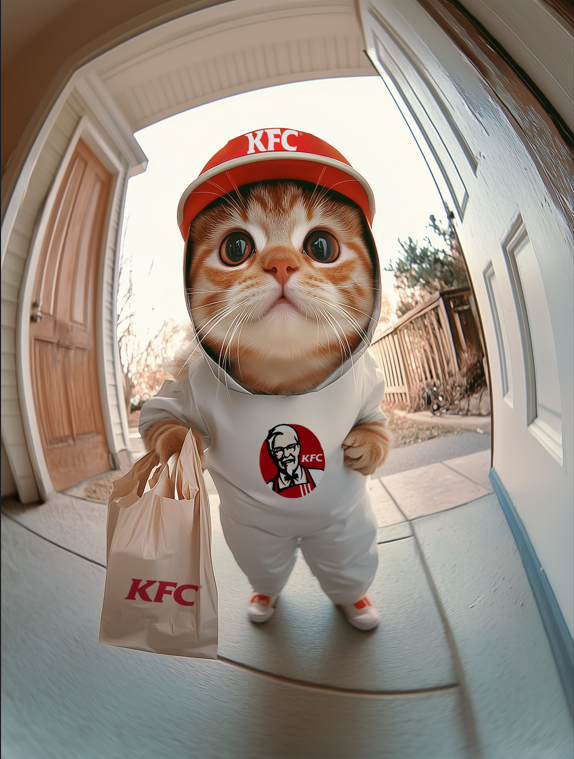
2. Prompt Engine
In image-to-video generation (unlike text-to-video), the scene already exists within the provided image. Therefore, the focus shifts to clearly defining the subject(s) and their desired motion(s). If your scene involves multiple subjects or movements, simply list them in sequence. Wondershare ToMoviee AI will interpret your prompt in the context of the image and expand it accordingly to generate a matching video.
For example, if your goal is to “make the girl in the painting wear headphones,” entering only “putting on headphones” is often too vague for the model. When the image is identified as a painting, ToMoviee AI may default to generating slow, cinematic panning shots rather than character animation, especially if the image contains frames or borders (which are best avoided). To improve accuracy, clearly specify both the subject and motion. For example, enter “The girl from Vermeer’s painting Girl with a Pearl Earring suddenly turns her head and lifts a pair of wireless headphones with her right hand to place them over her ears” for single-subject scenarios, or “The girl with the pearl earring lifts a pair of wireless headphones with her right hand and puts them on. The pearl earring sways gently as she moves” for multi-subject scenarios. Providing such detailed prompts helps the model understand your intent and produce more lifelike results.
|
Prompt = Subject + Motion, Background + Motion
|
Tips
-
Use simple words and sentence structures; avoid overly complex language.
-
Keep motions physically realistic and consistent with what could happen in the scene.
-
If descriptions deviate too far from the image, it may trigger unintended scene transitions.
-
Currently, it is challenging to accurately generate complex physical motions such as bouncing balls or objects thrown from heights.
3. API Requests
3.1 Request URL
https://open-api.wondershare.cc/v1/ai/capacity/application/tm_img2video3.2 Request Parameters
Header:
|
Parameter Name |
Value |
Required |
Example |
Description |
|
Content-Type |
application/json |
Yes |
|
|
|
X-Prod-Id |
|
Yes |
|
Product ID. |
|
X-User-Id |
|
Yes |
|
User WSID. |
Body:
|
Parameter Name |
Type |
Required |
Default Value |
Description |
Other Info |
|
prompt |
string |
Yes |
|
Prompt text, which can be in both Chinese and English. Recommended format: Subject + Motion + Camera Description. |
|
|
camera_move_index |
integer |
No |
|
Camera movement control type: 1: "orbit", 2: "spin", 3: "pan left", 4: "pan right", 5: "tilt up", 6: "tilt down", 7: "push in", 8: "pull out", 9: "static", 10: "tracking", 11: "others", 12: "object pov", 13: "super dolly in", 14: "super dolly out", 15: "snorricam", 16: "head tracking", 17: "car grip", 18: "screen transition", 19: "car chasing", 20: "fisheye", 21: "FPV drone", 22: "crane over the head", 23: "timelapse landscape", 24: "dolly in", 25: "dolly out", 26: "zoom in", 27: "zoom out", 28: "full shot", 29: "close-up shot", 30: "extreme close-up", 31: "Macro shot", 32: "bird's-eye view", 33: "rule of thirds", 34: "symmetrical composition". |
|
|
image_info |
object |
Yes |
|
Start frame information. |
Notes: Start frame information. |
|
resolution |
string |
No |
|
Video resolution. Valid values: 720p (default) and 1080p. |
|
|
duration |
integer |
No |
|
Video length. Unit: seconds. Valid value: 5 (default). |
|
|
aspect_ratio |
string |
No |
|
Video aspect ratio. Valid values: 16:9 (default), 9:16, 4:3, 3:4, 1:1, original. If original is used, the output will match the input image’s aspect ratio without cropping. Otherwise, the image may be cropped. |
|
|
wsid |
integer |
Yes |
|
User ID. |
|
|
callback |
string |
No |
|
Callback URL. |
|
|
params |
string |
No |
|
透明参数 |
|
|
priority |
integer |
No |
|
Priority level. |
|
|
units_value |
integer |
Yes |
|
Unit of credit deduction. For example, if the deduction is based on the image field, the amount will be calculated using the number of input images. |
|
|
drive |
string |
No |
|
If you use cloud storage for video/image output, this field is required in JSON format. Example: { "space_id": 11111, // Cloud storage space ID "file_dest_path": "/path/sss", // Cloud storage destination path (directory) "file_tag": [ // File tags { "key": "key1", "value": "value1" }, { "key": "key2", "value": "value2" } ] } If this field is not provided, the video_path field in the response will return a downloadable URL. |
|
Response parameters:
|
Parameter Name |
Type |
Required |
Default Value |
Description |
Other Info |
|
code |
integer |
Yes |
|
Error code. |
|
|
msg |
string |
Yes |
|
Error message. |
|
|
data |
object |
No |
|
|
Notes: |
|
task_id |
string |
No |
|
Task ID. |
|
3.3 Response
{
    "code": 0,
    "msg": "success",
    "data": {
        "task_id": "sky_img2video-0-202410098a764dafa0445d33ded5a532",
        "wsid": 0,
        "priority": 1,
        "status": 3,
        "reason": "success",
        "progress": 1,
        "position": -1,
        "wait_time": 91,
        "params": "tongyiemo",
        "result":"{\"video_path\":[\"fileId\"]}"
    }
}
3.4 Sample Requests
curl --location 'https://open-api.wondershare.cc/v1/ai/capacity/application/tm_img2video' \
--header 'X-Prod-Id: 14958' \
--header 'X-User-Id: 578608264' \
--header 'Content-Type: application/json' \
--data '{
    "prompt": "dance",
    "image_info": {
        "image": "url",
        "size": 9
    },
    "image_tail_info": {
        "image_tail": "url",
        "size": 9
    },
    "resolution": "1080p",
    "duration": 5,
    "aspect_ratio": "16:9",
    "wsid": 578608264,
    "params": "dasdfasdf",
    "callback": "http://www.baidu.com",
    "units_value": 1
}'